
👤 Roles — Can access: Mobile User · Can edit settings: Mobile User
Overview
Position averaging collects GPS readings over a configurable time window and uses the averaged position instead of a single instantaneous reading, improving accuracy for consumer GPS or poor satellite geometry.
ℹ️ App version: Soarvo Mobile 0.0.42+.
How It Works
Averaging is enabled per feature type. When capturing a point feature (or using the current position as a node), Soarvo collects readings over the configured window, filters out low-accuracy ones, and uses the mean position.
⚠️ Important: Averaging only triggers when using your current GPS position. Tapping the map to place a feature manually bypasses it.
Enabling Position Averaging
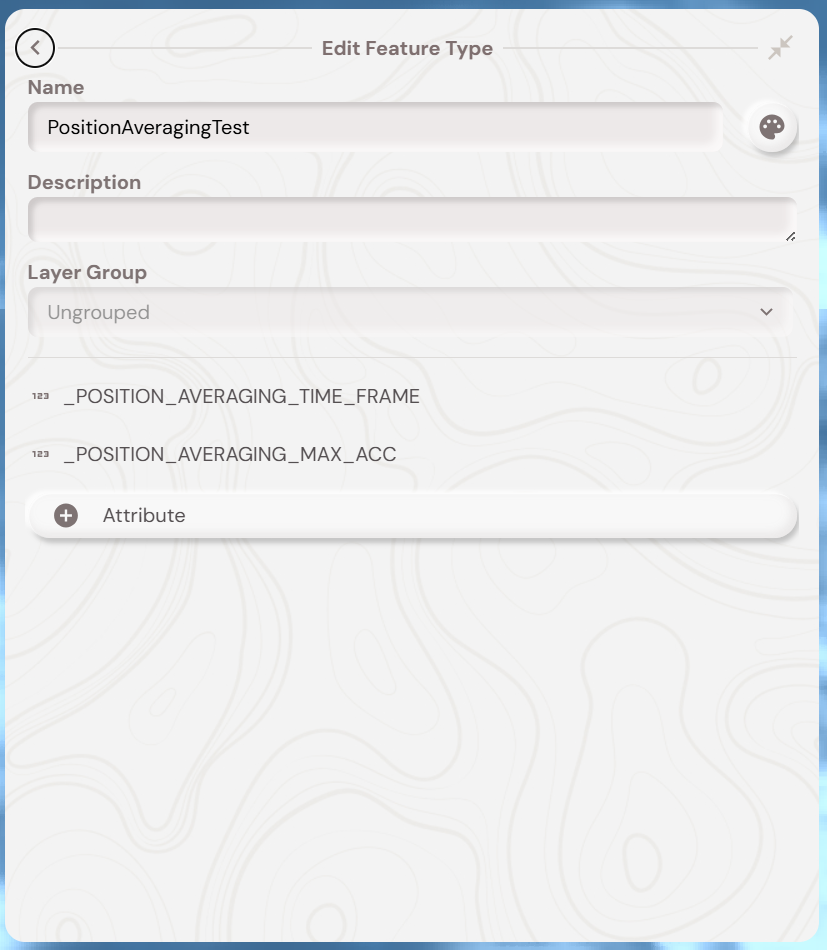
In the web portal, edit the feature type and add these numerical attributes:
Example: _POSITION_AVERAGING_TIME_FRAME = 30, _POSITION_AVERAGING_MAX_ACC = 5 → 30-second average, readings ≤ 5m accuracy only.
Syncing to the Mobile App
After updating in the portal, sync to the device by:
- Pull-to-refresh the feature list in any location, or
- Pull-to-refresh the feature type list (tap the green + button to see the list).
What's Next?