
Overview
There are several settings accessed the the General Settings menu
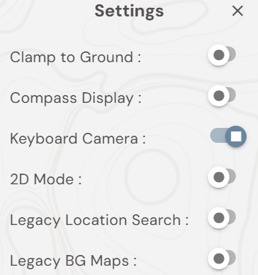
- Clamp to Ground - overrides elevation in data and sets height to Cesium terrain level.
- Compass Display - Displays a compass in the top left hand corner of the map. Double click to orientate the map to North aligned
- Keyboard Camera - allows for Keyboard controls to be used to move the map view. See Map Navigation Controls for keys to move the camera.
- 2D Mode - locks the camera into a 2D, for a traditional GIS view.
- Legacy Locations Search - turns a search bar on in the top right hand corner of the map
- Legacy BG Maps - access to the Cesium library of map and terrain options.