
👤 Roles — Can access: Mobile User · Can edit settings: Mobile User
Overview
Auto-add nodes lets a surveyor walk a route while Soarvo Mobile add nodes onto a linear or area feature each time they move past a configurable distance threshold.
ℹ️ App version: Soarvo Mobile 0.0.141+.
How to Enable Auto-Add Nodes
In the web portal, edit the linear or area feature type:
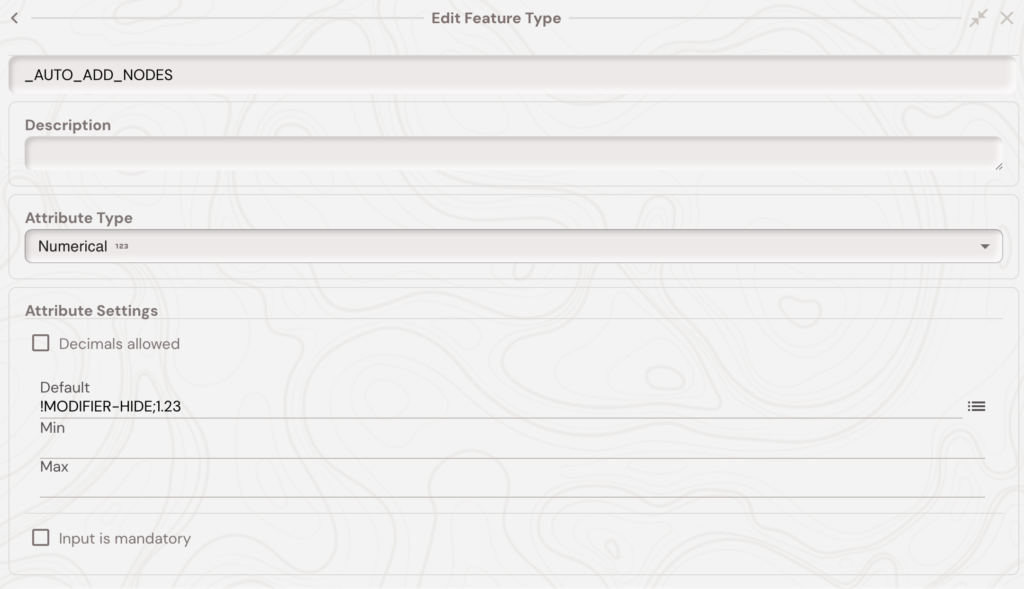
- Add a numerical attribute named
_AUTO_ADD_NODES. - Set its default to
!MODIFIER-HIDE;1.23where1.23is the minimum distance in metres per node.
!MODIFIER-HIDE hides the attribute from the form; the semicolon separates it from the default value.
Using It in the Field
- Start a new linear or area feature. Your current position becomes the first node.
- Tap Start to begin auto-adding nodes as you walk.
- A node is added each time you exceed the threshold from the last node.
- Tap Stop to pause, then resume by tapping start.
💡 Tip: 0.5–1.0m suits utility tracing; 3–5m works for boundary walking.
What's Next?